
Two sections generated in the same app, two prompts asking for the same thing: remember. The first memory lives on the member's device; the second is shared by the whole studio and fades out after thirty days. Nobody said where anything should be stored: the platform read it in the sentence. Here are the words that decided.
Prompt teardown, episode 2. The series where we take AI Extension Builder prompts apart to read what they actually trigger: what each sentence buys you, the calls the generation makes without being told, what the finished section really does. Today: two nearly identical prompts, written for a fitness studio's demo app — and a question neither of them was ever asked: who owns what the section remembers?
Two sentences, one verb
We asked the AI Extension Builder for two sections. Two everyday studio needs, deliberately mundane. The first:
“Checked items are remembered between visits.” — a gym-bag checklist that keeps its boxes ticked from one visit to the next.
The second:
“Entries stay visible for 30 days.” — a lost-and-found board where notices stay up for thirty days.
Two sentences built the same way: something has to stick around. Neither says where, nor how. If you had to bet, you'd say: same machinery underneath. Which is exactly where it gets interesting.
The first one says nothing
“My gym bag” came out of the generator as a ready-to-use checklist: eight default items (water bottle, towel, training shoes…), editable and extendable as requested, a progress bar, a “Personal checklist” banner. You tick a box, a confirmation slides in — “Saved to your bag” —, you close the app, you come back: the bag is exactly as you left it.
The detail that matters: the section never says where that memory lives. No account to create, no question asked, nothing to connect. It just works. This list is the member's, on their device — and the interface doesn't feel the need to say so, because there's nothing to say: that's how you expect a personal thing to behave.
The second one shows its hand
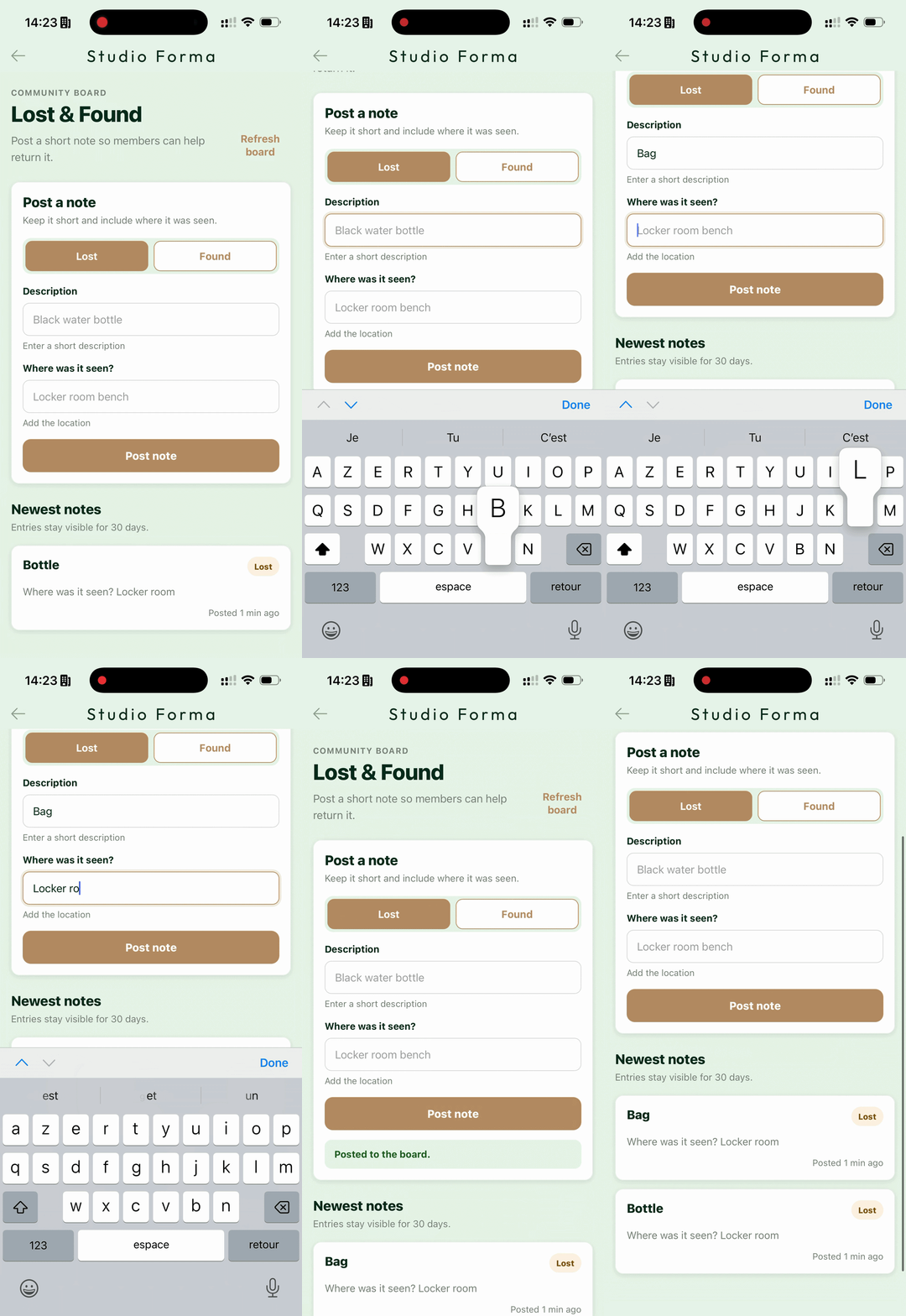
“Lost & Found” arrives with a whole different temperament. It tops itself with a banner nobody dictated — “Community board” — and introduces itself in a sentence the generation wrote on its own: “Post a short note so members can help return it.” Further down, the list of notices is titled “Newest notes” and states its rule: “Entries stay visible for 30 days.”
Nobody wrote those sentences. They rephrase the prompt as an interface promise: what you post here is meant for the others — that's its whole point. The form follows the description to the letter — one field for the item, one for the place — and every note gets tagged Lost or Found. The list shows newest first, every notice dated.
The first section kept quiet about its memory; this one introduces itself as a shared board — “community board”, in its own words. Two different contracts, and we still haven't written anything but plain, everyday sentences.
Two phones
The test that settles everything takes one gesture: open the app on two phones.
In “My gym bag”, each has its own list. Tick the water bottle on one, the other will never know — which is exactly what you want from a gym bag.
In “Lost & Found”, report a water bottle left in the locker room from the first phone. When the second one opens the section, the notice is there — tagged Lost, dated, at the top of the list.
Same app, installed twice, and two memories of a different nature: one belongs to the device, the other to the studio.
The words that decided
Back to the text. Neither prompt says a word about storage, accounts or syncing — the word “memory” isn't even in there. The difference is elsewhere:
“This list is personal to each member.”
“Anyone can post… All members see the same list.”
On one side personal, each member. On the other anyone, all members, the same list. The verb was the same — remember — but not the audience. What tipped the architecture is who the data is for: a memory for each person, sitting on the device; a memory for everyone, that follows the section wherever you open it.
Introducing the database the AI Extension Builder adds to your app, Mathieu wrote that the builder won't add a backend where one isn't warranted. This is how it knows: it doesn't scan your prompt for a technical keyword, it reads who your sentences give the data to.
Same mechanics for the time limit. “Stay visible for 30 days” was just an everyday sentence; it became an enforced rule — notices stop showing after thirty days. Your description doesn't inspire the section: it specifies it.
And if you had to maintain the code yourself? That call — where the data lives, who can read it, what makes it expire — would be an architecture decision to spell out and carry line by line, section after section. Here, it's read in your sentence, and what it commits stays yours: the shared memory runs on a data service wired to your app and subscribed in your name. What's in the studio's name lives with the studio.
The full prompts
Here they are exactly as pasted, not a line more:
Four sentences each. The difference that commands the whole architecture comes down, in each, to a single one.
Your turn
Take either prompt, change who the memory is for — give the checklist to the whole team, or make the board personal — and watch what the generation decides. It's the best exercise to feel what the platform actually reads in a description.
The previous episode took apart a section that remembers too — a parking spot — and reaches for the phone's GPS and Maps: Prompt teardown: GPS, memory, and Maps from a single sentence.
The AI Extension Builder is in beta, open to everyone: create an app with GoodBarber and describe your first section.
FAQ
How does the platform know whether a memory should be shared?
It reads who the data is for in your description. “This list is personal to each member” sets up an individual memory; “All members see the same list” sets up a shared one. There's no technical vocabulary to learn: describe who writes and who reads, and the platform picks the level that matches.
Can the same app have both kinds of memory?
Yes. The two sections in this article live side by side in the same demo app. Each section gets the level its description asks for — neither imposes anything on the other.
Where does the thirty-day rule come from?
From the prompt, and nowhere else: “Entries stay visible for 30 days”. The generation turned it into a rule of the section. A different duration — or no limit at all — is asked for the same way: in the sentence.
Do members need an account to post a lost item?
In this demo, no: the prompt says “anyone can post”, and the section takes it at its word — you post without signing in. Once again, the rule comes from the description.