
Nobody doubts anymore that an AI can generate capable code. The interesting question is what a generated section actually does inside your app — so we took a prompt and pulled it apart, line by line.
Seven words
Nobody doubts anymore that an AI can generate capable code — even "vibe-coded," it works, sometimes very well. That's not the interesting question. The interesting question is: once it's generated, what does that section actually do inside your app? Does it sit in a corner as an isolated block, or does it use what the phone and the app already know how to do? The most honest way to answer is to take a prompt and pull it apart, line by line.
That's what this series is for. In each episode, we'll take one prompt from the AI Extension Builder's library and pull it apart: where it trusts the platform, where it overrides it, and what the resulting section can really do. First up, one of the library's example prompts: "where did I park?"
Here's the shortest prompt you could write for this:
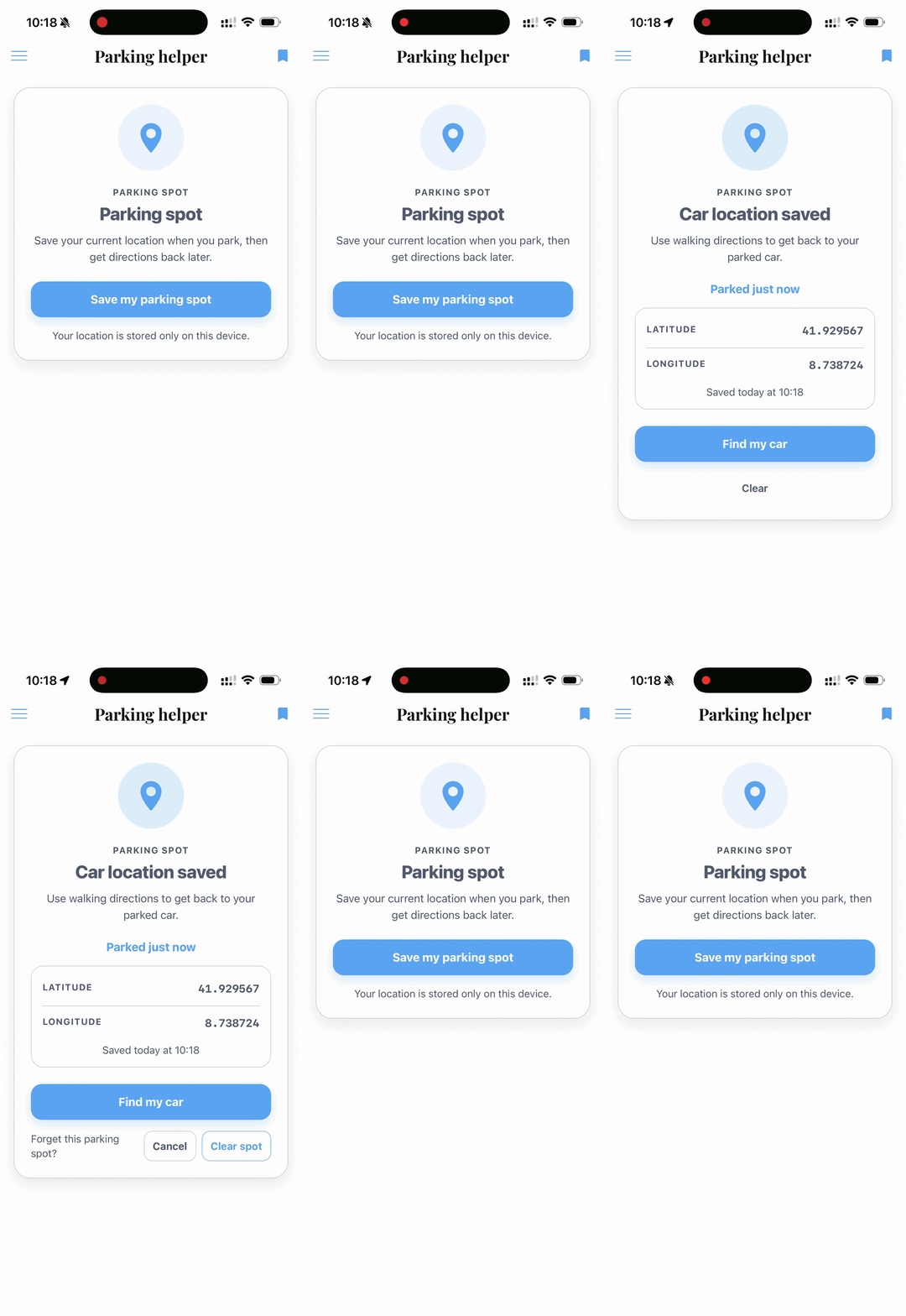
That's it. One sentence, not a spec. And here's what comes out:
A button to save your location. A section that finds that spot again when you reopen the app. A button to head back to the car. A discreet link to clear it. And if you decline location access, a screen that explains it instead of crashing.
The surprise isn't that seven words draw a screen. It's that this section, born from one sentence, already reaches the device: it reads the GPS, it keeps a memory, it opens Maps. We asked for none of those three things.
It didn't reach the phone directly — it went through the app

Here's the part that matters, and it's easy to miss. To get the GPS location, the section doesn't talk to the phone directly. It goes through the app that hosts it.
The app is what holds access to the GPS, and the section borrows it. The consequence is simple and reassuring: the section has no permission of its own. What the app is allowed to do, it inherits; what the app isn't allowed to do, the section can't force. And which permissions the app requests in the first place is your call as its maker — you declare them in the app's Privacy Center. A generated section stays strictly inside that frame; it opens no back door on the side.
That's exactly our guardrails philosophy: a generated section can do nothing the app itself doesn't allow. We don't let you cross, through a prompt, a line you never chose to open. The same logic governs the other two capabilities.
Memory. The section finds the saved spot again after you've closed and reopened the app. And we never asked for that persistence: the platform sets it up on its own the moment a section handles user data. Better, it tells the difference — a parking spot is simple, personal data, tied to the device: no need for a database like Supabase here, on-device storage is enough, and that's what it picks. That's the whole subtlety: knowing when a real backend is needed and when the device will do. Keeping what should be kept, in the right place, is the default — not a box to tick.
Maps. The "head back to the car" button doesn't draw a map inside the section: it opens the phone's Maps app, straight to the right coordinates. A generated section isn't a prisoner of its own screen; it knows how to hand off to what the phone already does well.
Three capabilities — GPS, memory, Maps — and every time the same principle: the section doesn't go it alone, it leans on the app around it. From the outside, for the user and for you, it's one coherent thing. That's the real subject of this episode — not the parking.
The default is already the right one
What makes this first example interesting is that we asked for none of it. We didn't write "use the native GPS," or "keep the data," or "open Maps." The section took those paths on its own, because they're the platform's.
Put another way: you don't earn the good behavior by piling detail into the prompt. It's the starting point. So the interesting question flips: can a wording take you off that good path?
It can. And that's where the library's longer prompt gets instructive.
The one place the prompt leaves the track
The real "where did I park?" prompt, in the library, is more detailed. Most of its sentences only enrich what we've already seen: a precise label, a "Parked 23 min ago" timestamp, a confirm step before clearing. Nothing that changes the section's nature.
Except one line. The prompt asks for Google Maps directions, computed from the current position to the car. And there, the section leaves the integrated path.
The reason has nothing technical about it: we named a specific service. Asking for "Google Maps" asks for Google Maps — the online service, at its web address — not "a map," which would have let the platform open the phone's own. So the section went outside the app to fetch that service. And like any section that reaches an outside service, it had to ask for permission: the platform showed the google.com domain and waited for your go-ahead before letting it out. (Guardrails again: nothing leaves the app's frame without your explicit say-so.)
We got exactly what we asked for. We also left the app for the web and added a domain to approve. It's not a bug, and it's not good or bad news: it's a trade, and it's worth making with your eyes open.
Hence the one rule to keep from this episode: describe the result you want, not how to get it. The short version, which just said "head back to the car," let the platform choose — and it opened the phone's Maps, without reaching anywhere outside. You only name a specific service or technology when you have a reason the platform couldn't know about.
The whole prompt
If you'd rather start from the full version and tweak it, here it is — the one from the library, one click away in the AI Extension Builder:
Your turn
The instructive move isn't to copy this prompt, it's to bend it. Swap the car for a bike, a campsite, a market stall. Drop the Google Maps line and watch the section go back to the phone's Maps on its own. Change "Parked 23 min ago" to something else and watch the format follow.
The library has more to take apart the same way: a shareable movie quiz, a playable Flappy Bird clone with a leaderboard, or a section that works with files you upload yourself.
The AI Extension Builder is in beta, open to everyone.
FAQ
Can an AI-generated app section use the phone's GPS?
Yes. Not directly: it goes through the app that hosts it, and inherits that app's location permission.
Does the section ask for its own location permission?
No. It relies on the app's. If the app has access, the section borrows it; if the app doesn't, the section can't force it.
Can a generated section keep data after the app is closed?
Yes. The platform sets up that persistence the moment a section handles user data, and picks the right level: on-device storage for simple data, a real backend when it's needed.
Can a generated section open Maps?
Yes. It opens the phone's Maps app, straight to the coordinates you want.
How do I write a good prompt for an app section?
Describe the result you want, not how to get it. The platform then picks the most integrated path. Only name a specific service or technology when you have a particular reason to.