
Six blockbusters are fighting for everyone's attention this summer. Here's a way to turn that into engagement inside your app: a personality quiz — "Which 2026 Summer Blockbuster Is Your Vibe?" — built entirely by describing it to GoodBarber's AI Extension Builder. One prompt in, one shippable section out. This article gives you the whole thing: what the quiz does, why the format works so well for content apps, and the exact prompt we used — written so you can steal it, reskin it, and make it yours.
The quiz
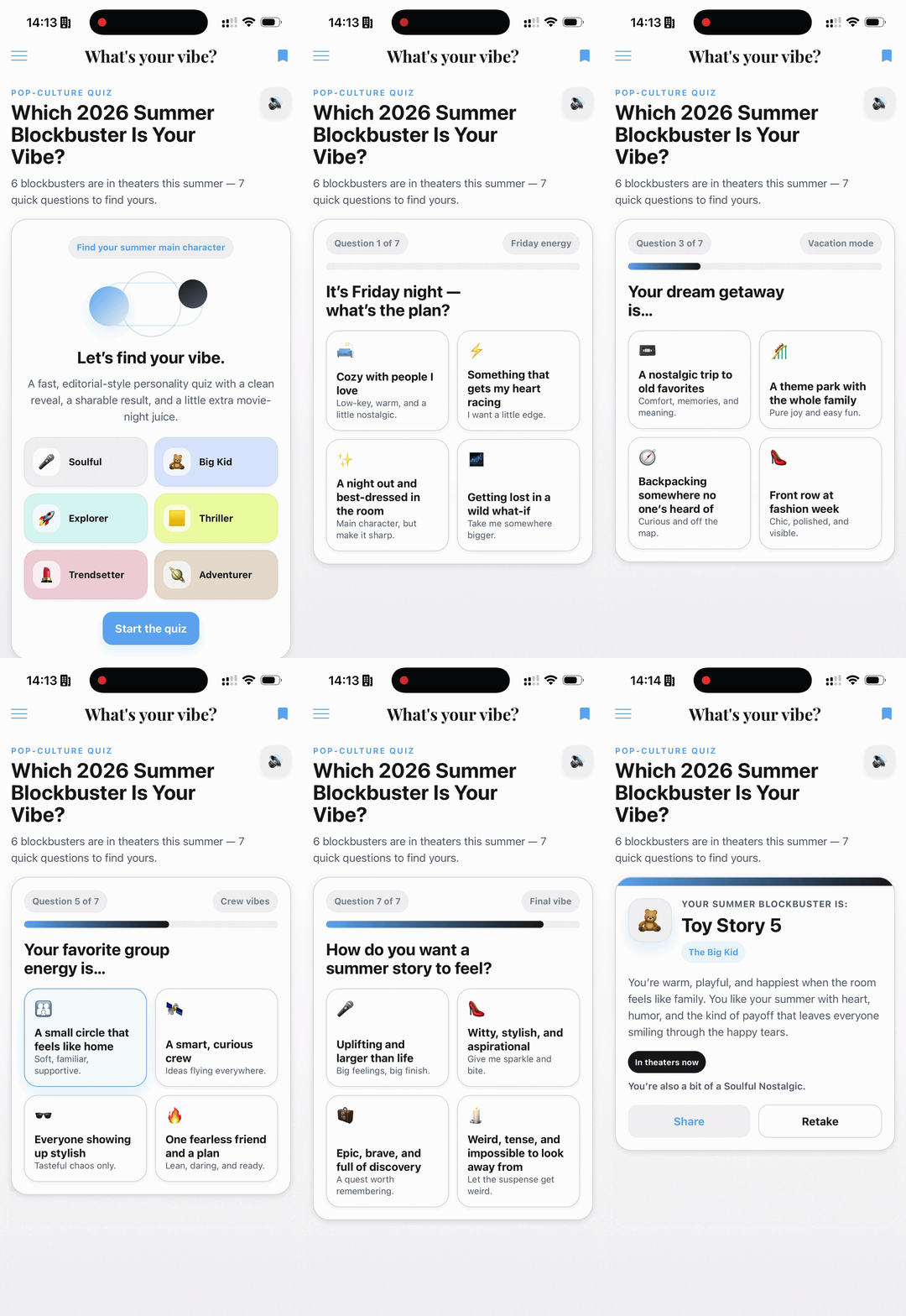
It opens on a bold intro screen: six color-coded mood tiles — original colors and icons, no posters, no studio artwork — and one promise: 6 blockbusters are in theaters this summer — 7 quick questions to find yours.
Then seven questions, and none of them are about movies. That's the secret of a personality quiz: it asks about you. "It's Friday night — what's the plan?" "Pick your summer soundtrack." Four tappable answers each, a progress bar, smooth transitions, a short "calculating your vibe…" beat — and the reveal: your movie, your persona ("The Explorer," "The Trendsetter," "The Big Kid"…), a personalized description in that movie's accent color, plus a runner-up line, because everyone is a little bit of two things.
Two buttons close the loop. Share copies a ready-made line to the clipboard — "I got Project Hail Mary — The Explorer! Which 2026 summer blockbuster is your vibe? 🎬" — and Retake, because half the fun is answering as your best friend.
Why this format earns its spot in your app
Personality quizzes are the workhorse of pop-culture publishing for a reason. They're instantly understood, weirdly irresistible, and built to be shared — a result card is a screenshot waiting to happen, and every share is your app traveling to someone new.
And because it's a section inside your app — not an embed from some quiz website — it inherits everything your app already has: your design system, your navigation, your audience. The engagement happens in your product, not on someone else's.
The prompt — steal it
There isn't a line of code behind this quiz: just a written brief, handed to the AI Extension Builder. Here it is — long on purpose (the flow, the rules, the guarantees), lightly reformatted for reading:
If you adapt it, four parts are doing most of the work — keep them:
1. Ask for guarantees, not just features. The brief never explains how to code the scoring. It states what must always be true: a fixed tie-break order so there's never a blank result, every one of the six outcomes genuinely reachable, rapid taps can't break the flow. Describe the invariants; the builder writes the code.
2. State the flow, screen by screen. Intro, questions, reveal, result: the prompt names each screen and what it must contain. You're not writing code — you're writing the storyboard, and the builder builds to it.
3. Make it screenshot-ready by design. "Clean, screenshot-friendly result card" is an instruction, not an accident. If you want shares, ask for shareability.
4. Encode the legal rules. Real titles, referenced editorially — and an explicit ban on logos, posters, stills, and character art. All visuals original. The prompt is where "fan-editorial, not infringement" gets enforced.
Full disclosure: Claude helped me get my ideas in order and write this prompt. Feel free to do the same — describing what you want turns out to be something AI is great at, too.
Make it yours
The movies are seasonal; the machine is not. Swap six blockbusters for six travel destinations, six recipes, six workout styles, six wines, six neighborhoods — the mechanics (mood questions, weighted answers, reveal, share) don't change, and neither does the prompt's skeleton. That's what prompt-to-section changes for editorial formats: they become something you spin up for a moment, not something you plan a quarter around. A quiz for the summer releases. Another for awards season. Retired when the moment passes, regenerated when the next one arrives.
One tip if you go seasonal: write the six outcomes first — persona name, two-line vibe, accent color — before touching the questions. The questions are easy once the personas are sharp; six sharp personas are the whole quiz.
Go further
- Can a no-code app builder make Flappy Bird? I tried — the wilder cousin of this build.
- We let an AI write code inside our no-code platform — generating it was the easy part — the engineering that makes generated sections safe to ship, on dev.to.
- The AI Extension Builder — build custom sections by describing them. In beta, open to everyone.
Your turn
Bring the Extension Builder the feature no catalog will ever offer you — a quiz for your niche, a calculator for your service, a countdown for your season. Describe it like you'd brief a colleague: the flow, the rules, the guarantees. If it can be described, it can be a section in your app by this afternoon.
In short
Do I need to code to build this quiz? No. Everything described here — flow, scoring, animations, share — came from the written brief above. Writing a good prompt is product thinking, not programming.
Can I reference real movie titles in my app? Editorial references — the way a magazine writes about this summer's releases — are standard fan-content practice, and the prompt bans everything beyond that: no logos, posters, stills or character art. For your specific case, check with your counsel — we're app builders, not your lawyers.
Will it match my app's look? The section is generated inside your app and themed with your colors — it lands in your design system, not next to it.